
Panora Panora Fleet

Beta

The defect your crew wrote down this morning, followed all the way to the repair.

Panora Fleet keeps your trucks, the defects from the daily vehicle report, the work order, what the repair cost, and when service is due. It sits in Panora, beside your crew's safety forms.

Beta sign-up open to DFW contractors running 10 to 50 trucks.

The Fleet overview in Panora, listing nine trucks in service with no vehicle report filed today. Sample data.
The Fleet overview opens on the trucks in service with no vehicle report today. Every screenshot on this page is sample data from a demonstration company.

Where a defect gets lost

  • Who has not filed a vehicle report today? Somebody has to go and find out, truck by truck.
  • A driver writes up a slow leak on the rear tire at pre-trip. Nobody tells the driver whether it got fixed. Next time the boxes get checked and the truck goes out.
  • The truck gets fixed. The record of it is somewhere else. The cost went into QuickBooks with the truck set up as a customer, and the invoice is wherever it landed.
  • The shop wants an OK on the brakes. The driver wants to know if the truck is done. Both are calling the office, and the truck sits. This is what we plan to build next.
  • An auditor or the insurer asks for a truck's records. The office has to put the binder back together first.

One defect, start to finish. Built today.

This part of Fleet is built. The screenshots are the real product running on sample data. Follow a defect from the report to the month's records.

  1. The crew files the vehicle report

    Your crew names the truck and writes down what is wrong on Panora's daily vehicle report. Fleet reads those reports, so nobody types the defect twice. Trucks named on recent reports wait in a tray until a safety manager or admin adds them with one tap.
  2. The defect waits until someone takes it

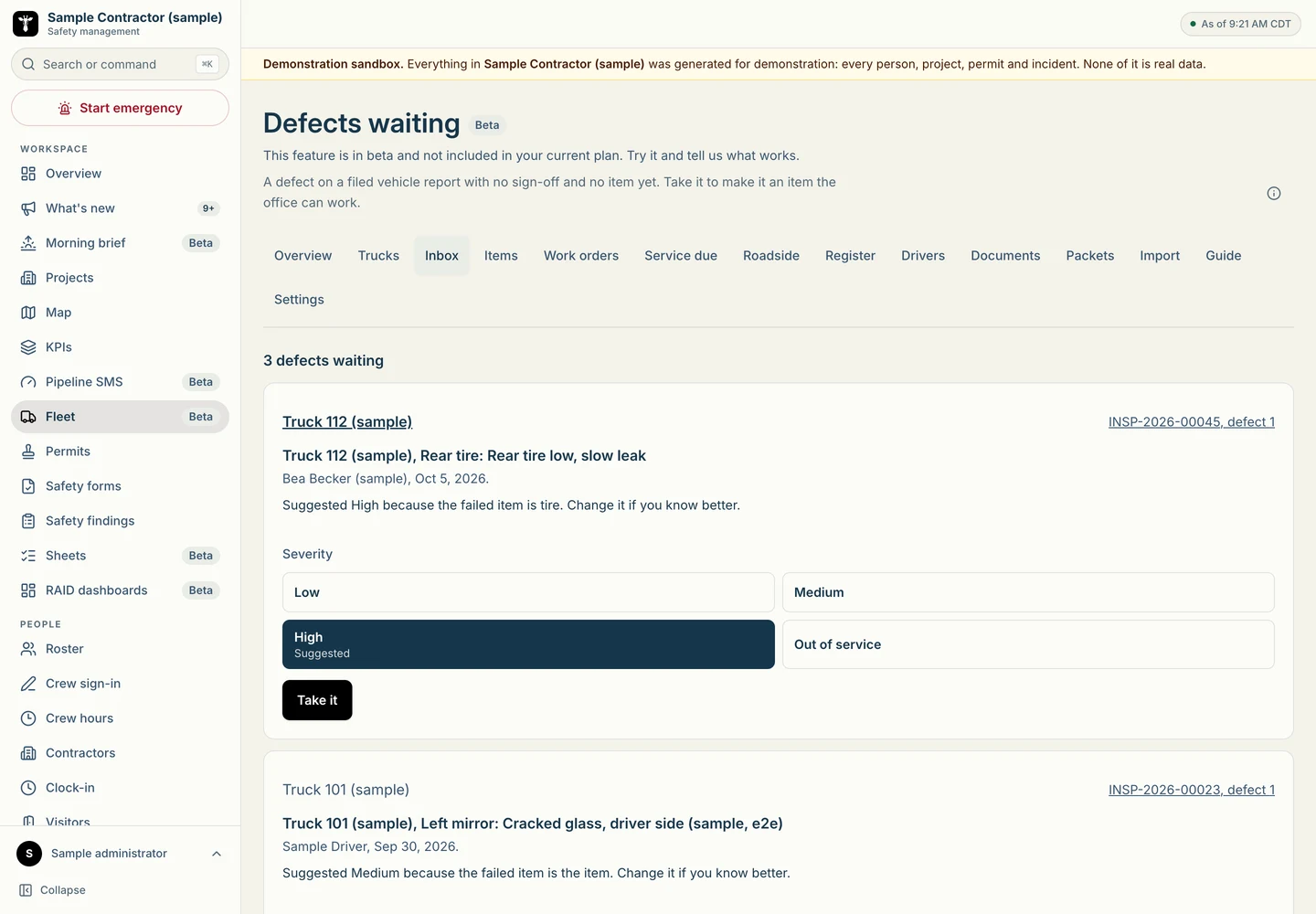
    A defect on a recent filed report, with no sign-off and no Fleet item yet, shows up in one list. Fleet suggests a severity from the item that failed, and you change it if you know better. Taking it opens an item linked to that report. The report itself is not changed.

  3. The repair, on someone's word

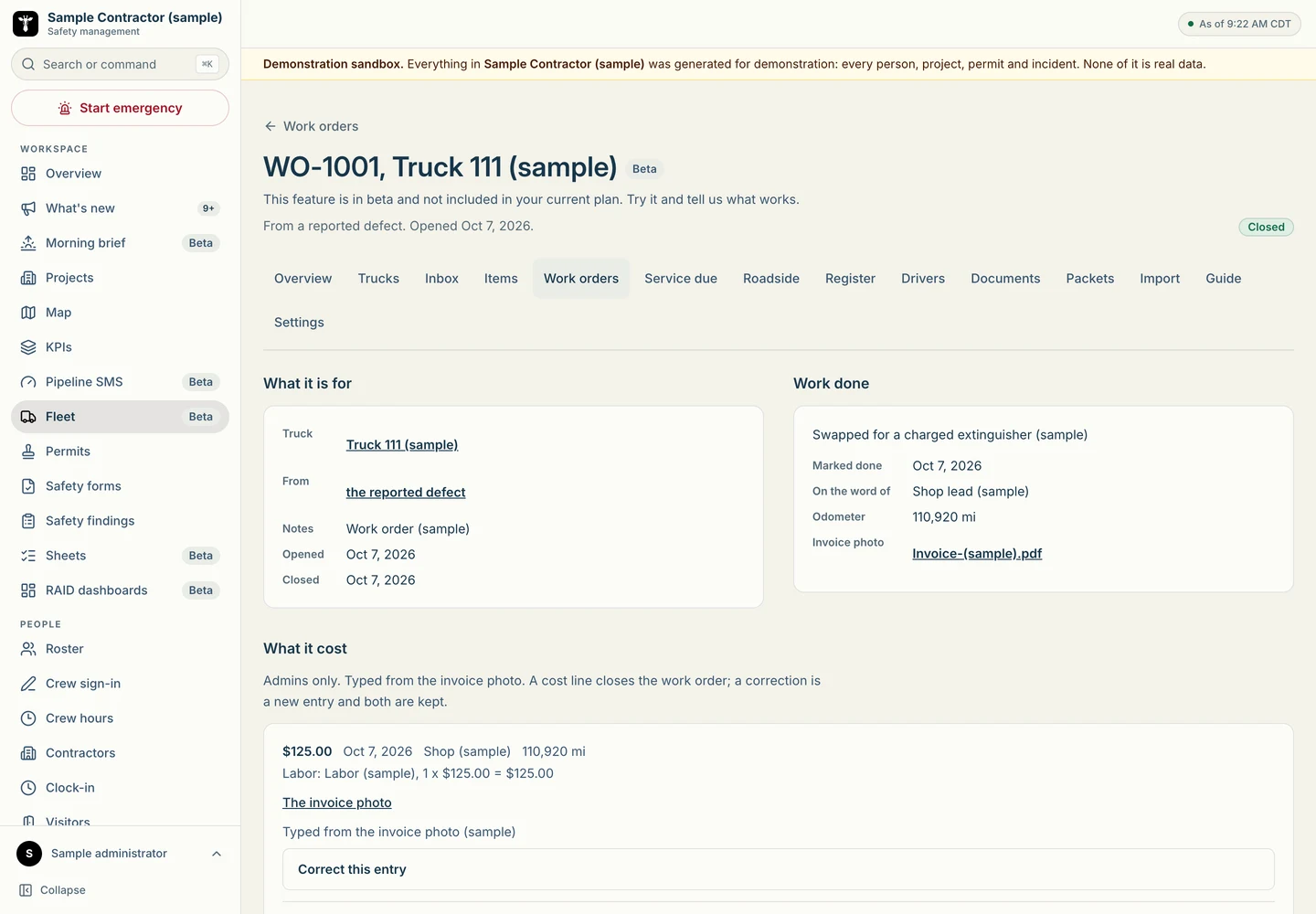
    The work order says which truck, which defect, what was done, the odometer, and whose word it is on. Attach the invoice photo or PDF. An admin types in the cost, and only admins see the cost fields. A correction is a new entry, and both are kept.

  4. The month, sealed into your records

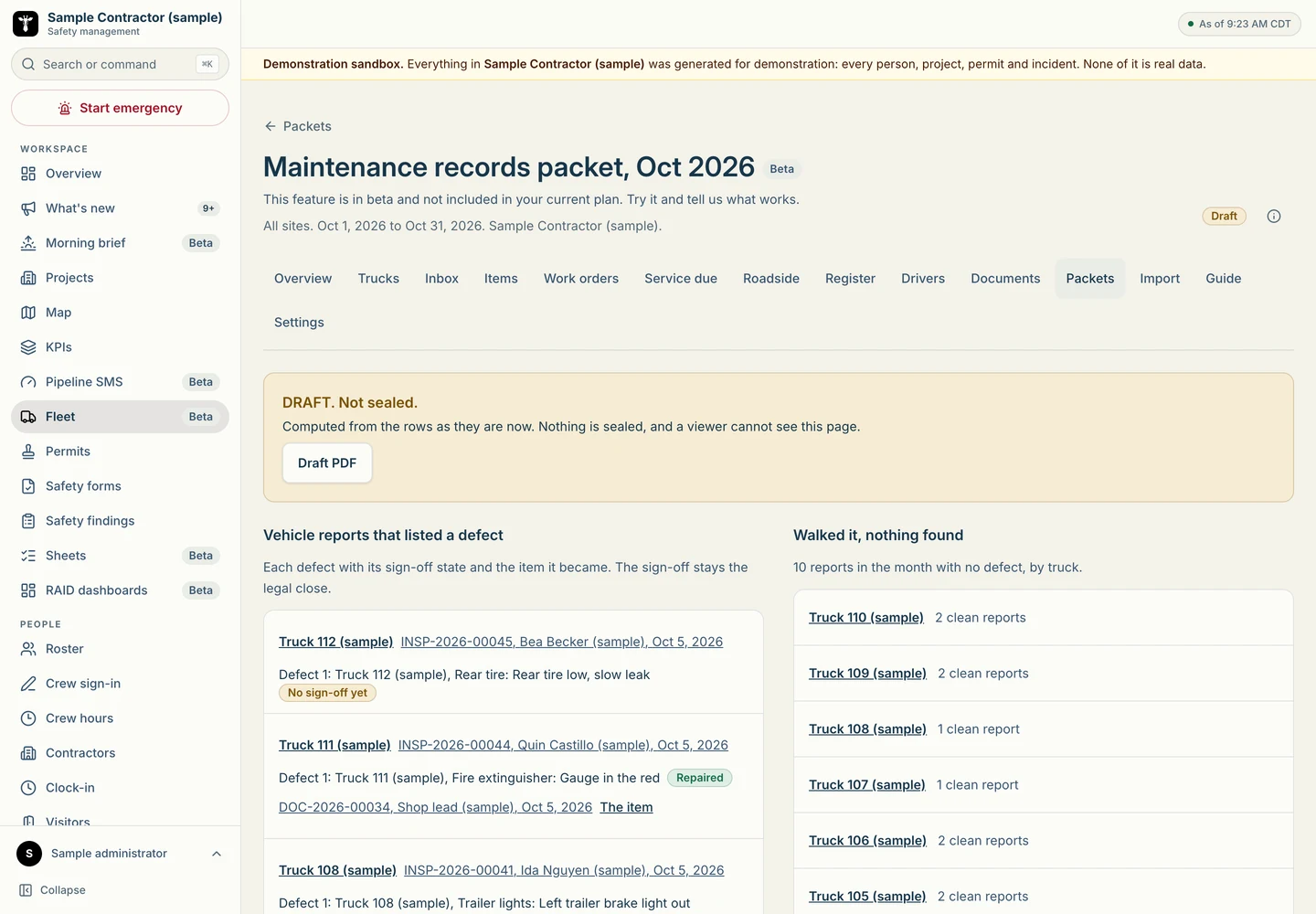
    At month end an admin seals a maintenance records packet: the vehicle reports that listed a defect, each one's sign-off state and the item it became, and the trucks walked with nothing found. It goes into your company's own records.

Also built

Service due by miles or months

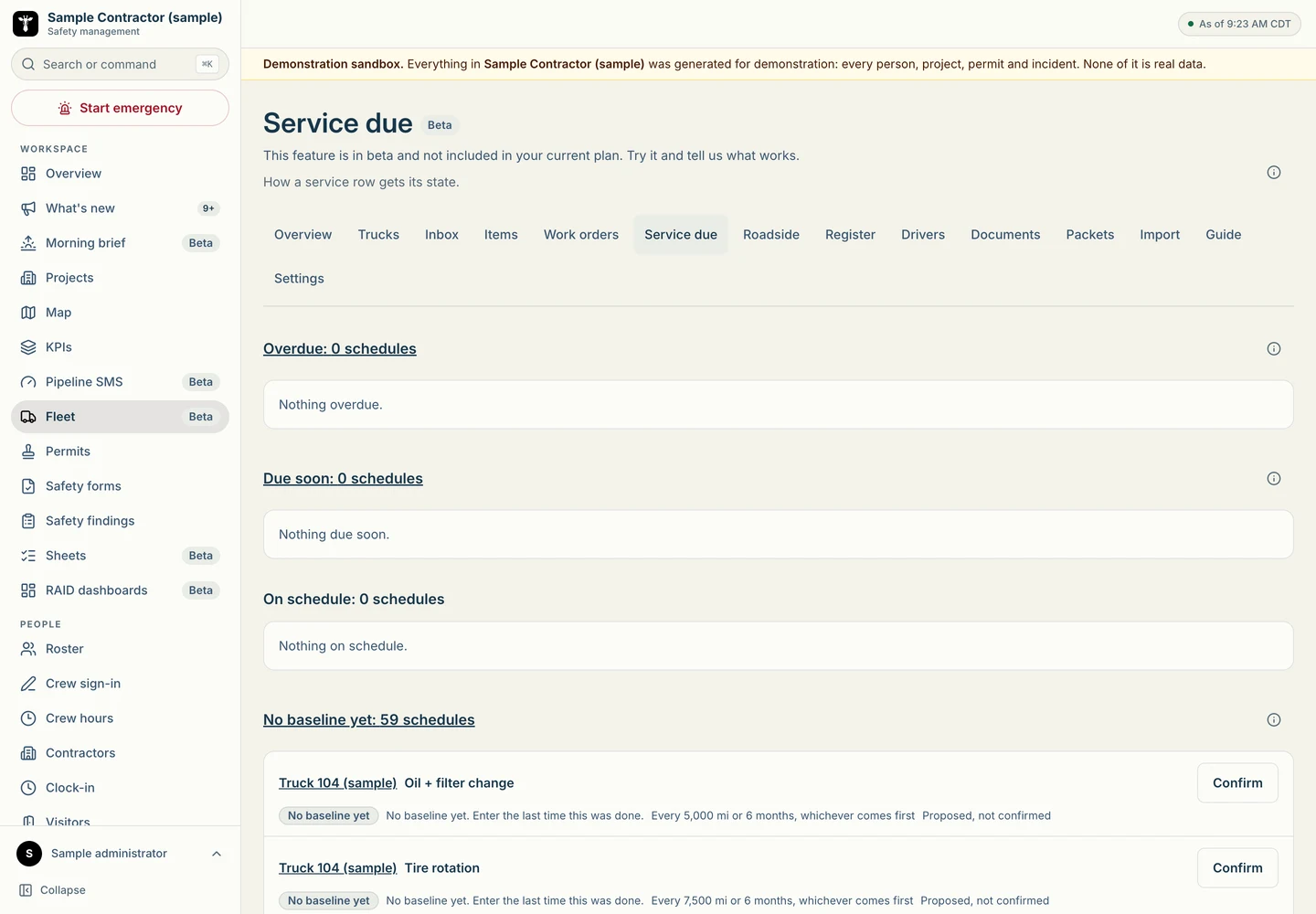
Whichever comes first. The list is your company's own, confirmed by a safety manager, starting from the last time each job was done. Nothing here predicts a failure.

Trucks and readings

The unit, the plate, the class, and the odometer readings, with the truck's reports and work orders beside it.

Cost per truck

Parts and labor from each invoice, kept against the truck. Admins only.

Roadside reports

The violations, and a return due date 15 days after the inspection.

Accident register

The day, the place, the driver, and whether anyone was hurt.

What we are building, in the open

As of October 8, 2026. Each line sits where it really is. We move a line when the work moves.

Built

Built and working on sample data. Being readied for the first beta companies.

  • Trucks, plates, classes and odometer readings
  • Defects from the vehicle report, taken into Fleet
  • Work orders through to done, on someone's word
  • Invoice photo, repair cost and cost per truck
  • Service due by miles or months
  • Roadside reports and the accident register
  • The monthly maintenance records packet

Being shaped

Built in part, with gaps beta users will help close.

  • The truck file going back further: today it shows the last 90 days of reports
  • Your company's own vehicle report checklist, set up with you
  • Due service and expiring documents in the morning brief, which is itself still in beta

Exploring

Questions we are asking, not promises.

  • Driver sign-in and truck data from the telematics you already run
  • Bringing your repair history over from the fleet software you use now
  • A short list of DFW shops willing to take repair requests by link
  • Yours. Tell us what you would put here.

How the beta works

Who it is for
DFW contractors running 10 to 50 trucks, whose crews file a daily vehicle report or are ready to start.
What happens
When the beta opens, we turn Fleet on for your company. It stays off until then, and it sends nothing on its own.
What we ask of you
Use it on your real trucks and tell us what works and what does not. What beta users tell us decides what moves on the list above.

Want in?

Send us your company name, how many trucks you run, and what you keep truck records in today. A paper binder is a fine answer.

Email us to join the beta

hello@panorafleet.com

Part of Panora

Fleet is a module of Panora, the safety platform for contractors. One login. The defect on the truck and the safety record of the crew that drives it live in the same place.

See Panora

  • Safety forms
  • Permits
  • Crew sign-in
  • Safety findings
  • Emergency muster
  • Fleet

Straight answers

Does Fleet text my drivers or send me alerts?

No. Due items show on the Fleet page. Fleet does not send texts, email or push notices.

Does it say my truck meets a rule?

No. Fleet records are your company's own maintenance records. They do not say a truck or a report meets any rule.

Who sees what a repair cost?

An admin enters the repair cost. A safety manager sees the work. Only an admin sees the cost fields. Invoice attachments may also show amounts.

Does it predict breakdowns?

No. Service is due by miles or months, whichever comes first, from a list your company confirms.

What does beta mean here?

Fleet is built and still changing. It is off until it is turned on for your company, and it sends nothing on its own.